Custom desktop pet
A Custom Desktop Pet Made From Your Photos
Add a few photos of your cat or dog in the Mac app. In under ten minutes you can see them in 3D, free, before deciding to keep them.

Photo in, pet out
A custom desktop pet starts with your photos, not a template. You add pictures of your own cat or dog in the Mac app, and we build a 3D model from them. That model becomes the pet that walks along your Dock, naps on top of your windows and turns to watch your cursor.
You don't need a photo shoot. A side view and a clear face are enough to start. The side view gives us their shape: how long the legs are, how the back curves, where the tail sits. The face gives us their expression. If you have more angles, add them; they help, particularly for markings that only show from one side.
A side view
Your pet standing or walking, seen from the side. This gives us their shape: legs, back, tail.
A clear face
Looking roughly at the camera, in focus, not too dark. This is where their expression comes from.
Anything extra
A back view, the other side, a close-up of a patch or a sock. More angles help, but they're optional.
Old or imperfect photos are fine to try. Many people's best pictures of their pet are a few years old, a little blurry, or taken on the sofa in bad light. Use them. The preview is free, so the worst case is that you try again with different ones.
The white sock stays a white sock
A generic desktop pet is a cat or a dog. Yours should be your cat or your dog. So the part we care most about is the small stuff: the markings and quirks you'd recognise from across a room.
If your dog has one white sock, the model has one white sock, on the same paw. If one ear flops and the other stands up, that's how it comes out. A white blaze down the nose, a ginger stripe pattern, a pale bib on a dark chest: these come from your photos, not from a breed average.


Milo
Border collie, from two photos

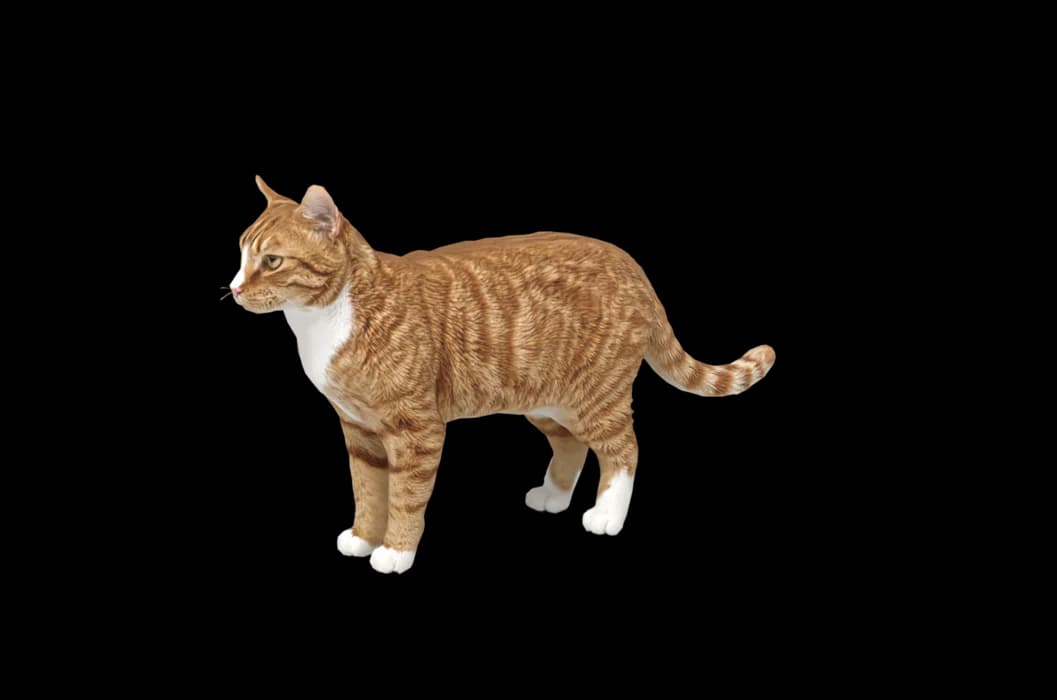
Biscuit
Ginger tabby, from two photos
That works across breeds and across mixes nobody can name. For a sense of how it handles particular coats, see the border collie, tabby cat and corgi pages.
From photo to 3D in under ten minutes
Everything happens in the Mac app. The website is where you download it and find your receipts; making your pet is done on your Mac. Once your photos are in, it usually takes five to eight minutes to build your pet in 3D.
When it's ready, you can turn your pet around and look at them from every side, next to the photos you gave us. Check the ears, the tail, the colour of the paws. If something is off, ask for a change before you pay a thing. Seeing the 3D preview is free.
Once you keep them, your pet moves onto your desktop with 25 animations: walking the Dock, jumping up to nap on a window, sitting, grooming, stretching, yawning, and falling asleep when you've been away for about five minutes. You can call them from the menu bar, pet them by scrolling over them, and pick them up and drop them somewhere new. For the full picture of daily life on your screen, read about our desktop pet for Mac.
Two free regenerations, and money back if it isn't them
We'd rather you had your pet than your money, but if we can't get it right, you should have your money. So after you buy, two regenerations are included. If a marking is missing or the proportions look wrong, run it again.
If it still doesn't look like your pet, there's a 14-day money back promise. That's the whole test: does it look like them?
For people who want a person to look at the model too, there's Pet perfected at $49. An artist hand-checks your pet and refines the model within 48 hours. It's optional; most pets don't need it.
If the pet you want to bring back has passed away, you're not alone in wanting that. Our page on memorial pets explains how we approach those.
Your photos stay yours
We use your photos only to make your pet. They're deleted 30 days after delivery, or sooner if you ask. We never use them to train anything unless you choose to opt in.
What you get, and what it costs
The 3D preview is free. Keeping your pet is $19 once. There's no subscription. That one purchase includes:
- Your pet on up to three of your Macs.
- Two free regenerations.
- Every behaviour and app update we add later.
- A 14-day money back promise if it doesn't look like your pet.
Another pet is $9, so a cat and a dog can share your screen. You'll need an Apple silicon Mac (M1 or later) on macOS 14 or newer. The app is sold directly, not through the App Store.
How it works
Step 1
Add photos
In the Mac app, add a few photos of your cat or dog. A side view and a face are enough to start.
Step 2
See them in 3D, free
In under ten minutes you can turn them around and compare them with your photos. Nothing to pay yet.
Step 3
They move in
Keep them for a one-time price and they live on your desktop: walking the Dock, napping on your windows.
Pricing
Free
See your own pet in 3D before you pay anything.
$19 once
Keep them. No subscription. Up to 3 of your Macs, 2 free regenerations, every behaviour we add later.
14-day money back
If it doesn't look like your pet, you get your money back. No questions asked.
Another pet is $9. All pricing
Questions
How many photos do I need for a custom desktop pet?
A side view and a clear face are enough to start. More angles help, especially for markings that only show from one side, but they're optional.
Can I use old or imperfect photos?
Yes, try them. Old phone photos, slightly blurry ones and pictures from years ago can all work. You see the 3D result free, so there's nothing to lose by trying.
How long does it take to make my pet?
Usually five to eight minutes, inside the Mac app. You can compare the 3D model with your photos straight away and ask for changes before paying.
What if it doesn't look like my pet?
Ask for a change. Two regenerations are included after you buy, and if it still doesn't look like your pet, there's a 14-day money back promise.
What happens to my photos?
They're used only to make your pet. We delete them 30 days after delivery, or sooner if you ask, and never use them for training unless you opt in.
Is there an option where a person checks the model?
Yes. Pet perfected is $49: an artist hand-checks and refines your pet's model within 48 hours.
Can I make more than one pet?
Yes. Your first pet is $19 once, and each extra pet is $9.
Meet them in 3D
Download the Mac app, add a few photos, and see your pet in 3D before you pay anything.
See your pet in 3D free